Step 4: Install in Claude Code
Preview: coming in Artifact Keeper 1.12.0
The agentplugins format is not in a released version of Artifact Keeper yet. It first
ships in 1.12.0. Until then this walkthrough runs a development build from main
(sha-c3a650e) and a CLI prerelease (v1.11.0-rc.2), so details may still change before
the release.
Claude Code is the one agent that reads a hosted marketplace: point it at
claude-marketplace.json and it downloads each plugin's archive, checks the sha256,
and installs it. No ak, no git, nothing else on the machine. Plugin management needs no
Anthropic account either: everything on this page ran in a workstation container that never
logged in.
The question for a private repository is how Claude Code authenticates, because
claude plugin marketplace add has no option for credentials. There are two answers, and
make consume-claude runs both, plus a public repository. Each
runs in its own throwaway home under out/homes/.
1. The settings route (recommended)
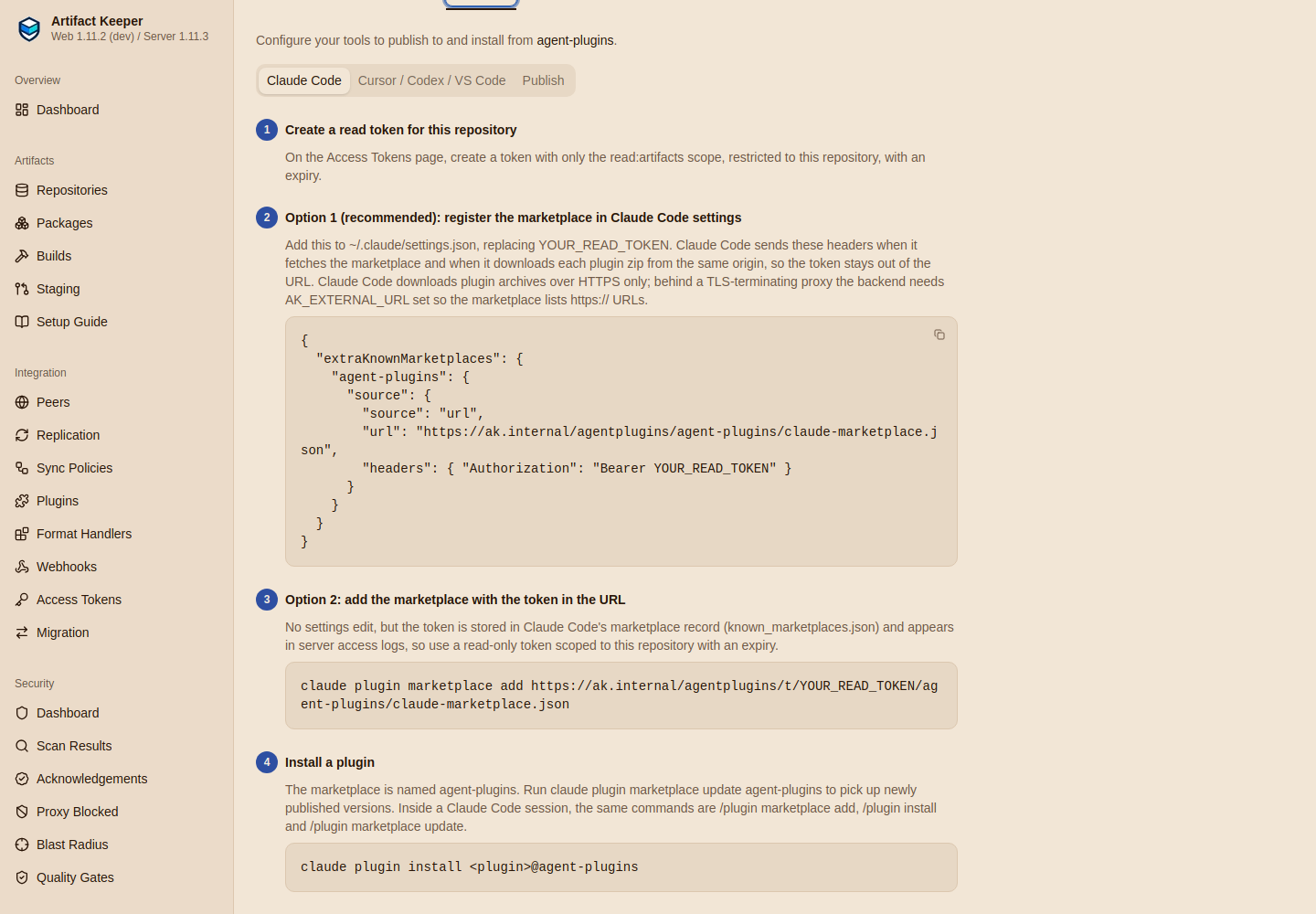
Declare the marketplace in Claude Code's settings with an Authorization header. On a managed
fleet this goes into managed settings; here it is the user's ~/.claude/settings.json:
{
  "extraKnownMarketplaces": {
    "agent-plugins": {
      "source": {
        "source": "url",
        "url": "https://ak.internal/agentplugins/agent-plugins/claude-marketplace.json",
        "headers": {
          "Authorization": "Bearer <developer token>"
        }
      }
    }
  }
}
The key, agent-plugins, must be the document's name (the marketplace_name the publish
response gave). Claude Code sends the headers on the catalog fetch and on every archive download
from the same origin, which is why the registry streams the zips itself instead of redirecting
to object storage: a redirect to another origin would drop the header.
Claude Code registers a marketplace declared in settings when a session starts, not when
you run a claude plugin command. On the first run, claude plugin marketplace update
agent-plugins answered Marketplace 'agent-plugins' not found. Starting a session fixes
it; without an account the session stops at the login prompt, after that step:
$ claude -p hello    (starts a session: registers the marketplace, then stops at the login)
Not logged in · Please run /login
$ claude plugin marketplace list --json
[
  {
    "name": "agent-plugins",
    "source": "url",
    "url": "https://ak.internal/agentplugins/agent-plugins/claude-marketplace.json",
    "installLocation": "/home/dev/.claude/plugins/marketplaces/agent-plugins"
  }
]
$ claude plugin install acme-review@agent-plugins --json
{"command":"install","outcome":"ok","plugin":"acme-review@agent-plugins","pluginId":"acme-review@agent-plugins","scope":"user","message":"Successfully installed plugin: acme-review@agent-plugins (scope: user)"}
$ claude plugin install acme-standards@agent-plugins --json
{"command":"install","outcome":"ok","plugin":"acme-standards@agent-plugins", ...}
$ claude plugin list --json
{"id":"acme-review@agent-plugins","version":"1.0.0","enabled":true}
{"id":"acme-standards@agent-plugins","version":"1.0.0","enabled":true}
A developer who opens Claude Code normally gets the same on their first start. The installed
files land in ~/.claude/plugins/cache/agent-plugins/<plugin>/<version>/, byte for byte the
published zip (gate G4 diffs them):
./acme-review/1.0.0/.claude-plugin/plugin.json
./acme-review/1.0.0/README.md
./acme-review/1.0.0/agents/reviewer.md
./acme-review/1.0.0/commands/checklist.md
./acme-review/1.0.0/hooks/hooks.json
./acme-review/1.0.0/skills/review/SKILL.md
./acme-standards/1.0.0/README.md
./acme-standards/1.0.0/mcp.json
./acme-standards/1.0.0/plugin.json
./acme-standards/1.0.0/skills/acme-secure-defaults/SKILL.md
./acme-standards/1.0.0/skills/acme-style/SKILL.md
The Caddy access log shows Claude Code's requests, with the header redacted by Caddy:
/agentplugins/agent-plugins/claude-marketplace.json                    200  REDACTED  Claude-Code-Plugin-Manager
/agentplugins/agent-plugins/acme-review/1.0.0/acme-review-1.0.0.zip    200  REDACTED  Claude-Code-Plugin-Manager
Where the token ends up: settings.json, where you put it, and a copy of the same entry in
~/.claude/plugins/known_marketplaces.json. Never in a URL, a cache or a log. On machines you
manage, replace headers with headersHelper, a command that prints the header from your
secret store at fetch time, so no file holds a long-lived token.
The web UI's Setup tab for the repository gives the same two routes, filled in for the repository:
2. The token-in-path route (no settings edit)
When you cannot edit settings, put a read-only repository token in the URL. The registry
serves every read route under /agentplugins/t/<token>/, and every archive URL in the
document it returns keeps that prefix, so installs authenticate the same way:
$ claude plugin marketplace add https://ak.internal/agentplugins/t/<developer token>/agent-plugins/claude-marketplace.json --json
{"command":"marketplace-add","outcome":"ok","marketplace":"agent-plugins","message":"... Successfully added marketplace: agent-plugins (declared in user settings)"}
$ claude plugin install acme-release-notes@agent-plugins --json
{"command":"install","outcome":"ok","plugin":"acme-release-notes@agent-plugins", ...}
The token is stored in plain text, in three files
After that marketplace add, the token is in ~/.claude/settings.json (the URL is
declared there), in ~/.claude/plugins/known_marketplaces.json, and in the cached copy of
the marketplace document under ~/.claude/plugins/marketplaces/ (once per archive URL).
It is also in your shell history. Use a read-only token scoped to the one repository, with
an expiry (the walkthrough's is 30 days), and revoke it with
DELETE /api/v1/repositories/agent-plugins/tokens/{id} when the machine no longer needs it.
What the registry does to contain it: the token-route responses carry
Cache-Control: private, no-store so no shared cache keeps them, and the token is replaced
with [REDACTED] in the backend's request log. The backend documents
Referrer-Policy: no-referrer on these responses too, but the build used here sends
strict-origin-when-cross-origin (its global security-headers layer overwrites the route's
value); the walkthrough's Caddy restores no-referrer and rewrites the token out of its own
access log. Gate G10 checks both logs (Step 8).
3. A public repository
A public repository needs nothing:
$ claude plugin marketplace add https://ak.internal/agentplugins/agent-plugins-public/claude-marketplace.json --json
{"command":"marketplace-add","outcome":"ok","marketplace":"agent-plugins-public", ...}
$ claude plugin install acme-release-notes@agent-plugins-public --json
{"command":"install","outcome":"ok","plugin":"acme-release-notes@agent-plugins-public", ...}
What needs an account
| Command | Account needed |
|---|---|
claude plugin validate, marketplace add, marketplace list, marketplace update, install, update, list, details, uninstall |
no |
claude -p ... (a session; registers settings-declared marketplaces before it stops) |
yes, to get past the login |
| using a skill, command, agent or hook | yes |
To see the plugins work, log in inside one of the homes and ask for them:
client/run.sh -h claude-settings -- claude      # then /login, then:
#   /acme-review:checklist
#   "review the last commit"   (loads the review skill)
Gate G4 reports that check as BLOCKED(account) with the same commands.