Step 2: A private registry for internal servers
Preview: needs Artifact Keeper main (coming in 1.12.0)
The mcp repository type is on main and not in a release yet. It is pull request
artifact-keeper#5257
(issue #5253), merged as
4542321b, with the web UI in
artifact-keeper-web#1077
(merged as 896a79db). Both ship in the next release, 1.12.0. The reference run used images
built from the pull request branches (backend c89f9cea, web 89313d4); the branch gained
fixes before it merged, some for the findings here, and the walkthrough has not been rerun
on main. Details may still change before 1.12.0.
Acme's platform team has an MCP server, com.acme/tickets: a small stdio server with two
read-only tools, list_tickets and get_ticket
(servers/acme-tickets/).
It ships two ways, as an npm package and as a container image. This step publishes both and
the registry entry that describes them, then points clients at the registry.
make publish   # npm package, image, /validate, mcp-publisher publish
make clients   # what VS Code and Copilot read; Claude Code; a real tool call
Publish the packages first
Under the own-repos package policy, a server is accepted only when the packages it runs are
already in this Artifact Keeper. So a publishing job has three parts, in this order
(flows/publish.sh),
all with the ci token.
The npm package goes to npm-internal with a plain npm publish:
$ npm publish --registry https://ak.internal/npm/npm-internal/
npm notice package: @acme/tickets-mcp@1.0.0
npm notice total files: 2
npm notice Publishing to https://ak.internal/npm/npm-internal/ with tag latest and default access
+ @acme/tickets-mcp@1.0.0
npm finds the token by the registry's exact path, so ~/.npmrc has one line per repository:
//ak.internal/npm/npm-internal/:_authToken=${AK_TOKEN}.
The image is built from
servers/acme-tickets/Containerfile,
which labels it with the server's name (io.modelcontextprotocol.server.name=com.acme/tickets).
It is built on the host with podman, saved as an archive, and copied to the registry by skopeo
(a tool that copies images between registries) inside the workstation, so it reaches the
registry by its real name:
$ skopeo copy --dest-creds ci:$AK_TOKEN oci-archive:/out/images/tickets-mcp-1.0.0.tar \
    docker://ak.internal/oci-internal/acme/tickets-mcp:1.0.0
$ skopeo inspect ... docker://ak.internal/oci-internal/acme/tickets-mcp:1.0.0
{"Digest":"sha256:25f85fd5e77bab8a3e5b72ba1f25d3d907060608fd9b7ddb077beb1cccaa752d","label":"com.acme/tickets"}
Validate, then publish the entry
servers/acme-tickets/server.json
is the registry entry (schema 2025-12-11). Abridged:
{
  "name": "com.acme/tickets",
  "version": "1.0.0",
  "packages": [
    {"registryType": "npm", "identifier": "@acme/tickets-mcp", "version": "1.0.0",
     "runtimeHint": "npx", "transport": {"type": "stdio"}},
    {"registryType": "oci", "identifier": "ak.internal/oci-internal/acme/tickets-mcp:1.0.0",
     "runtimeHint": "docker", "transport": {"type": "stdio"}}
  ],
  "_meta": {"io.modelcontextprotocol.registry/publisher-provided": {
    "com.artifactkeeper/capabilities": {"tools": [{"name": "list_tickets", ...}, {"name": "get_ticket", ...}]}}}
}
The npm entry has no registryBaseUrl: the registry fills it in. The image names a tag; the
registry pins the digest. The _meta block declares the tools, which the registry records and
lints (Step 4, Step 7).
POST /validate is a dry run of a publish. It tells you what would happen to each package:
$ curl -X POST -H "Authorization: Bearer $AK_TOKEN" --data-binary @server.json \
    https://ak.internal/mcp/mcp-internal/v0.1/validate
HTTP 200
{"issues":[],"packages":[{"index":0,"outcome":"pinned","registryType":"npm"},{"index":1,"outcome":"pinned","registryType":"oci"}],"valid":true}
pinned for both. Had a package been missing, the answer would say so, and the script stops:
a CI job should publish only when every package is pinned
(lab notes, O1).
On a private registry /validate needs a token, so mcp-publisher validate (which sends none)
gets 401; call it with curl.
mcp-publisher is the official registry's CLI. It reads the registry URL and token from
~/.config/mcp-publisher/token.json. Instead of mcp-publisher login, which only knows the
official registry's login methods, write the file with an Artifact Keeper token:
$ jq -n --arg t "$AK_TOKEN" '{token: $t, method: "none", registry: "https://ak.internal/mcp/mcp-internal"}' \
    > ~/.config/mcp-publisher/token.json
$ cd servers/acme-tickets && mcp-publisher publish
Publishing com.acme/tickets@1.0.0 to https://ak.internal/mcp/mcp-internal...
✓ Successfully published
✓ Server com.acme/tickets version 1.0.0
What the registry serves
Read back with the developer's token, the entry carries Artifact Keeper's coordinates: the npm
package's registryBaseUrl is npm-internal, and the image is pinned to the digest it had at
publish time.
{
  "name": "com.acme/tickets",
  "version": "1.0.0",
  "packages": [
    {"registryType": "npm", "identifier": "@acme/tickets-mcp", "version": "1.0.0",
     "registryBaseUrl": "https://ak.internal/npm/npm-internal"},
    {"registryType": "oci",
     "identifier": "ak.internal/oci-internal/acme/tickets-mcp:1.0.0@sha256:25f85fd5e77bab8a3e5b72ba1f25d3d907060608fd9b7ddb077beb1cccaa752d"}
  ],
  "source": {"repository": "mcp-internal", "origin": "hosted", "packagePolicy": "own-repos"}
}
A client that follows these coordinates installs exactly what was reviewed, from the registry.
Point the clients at it
flows/clients.sh
does what each client does, as far as it can be scripted. It also writes the client settings to
out/clients/.
VS Code (not machine-verified)
VS Code's MCP gallery reads a registry URL from one setting (or the McpGalleryServiceUrl
policy on managed machines):
The gallery lists GET /v0.1/servers and, when you pick a server, reads
/versions/latest. Both answered as VS Code expects:
$ GET /mcp/mcp-internal/v0.1/servers
{"name":"com.acme/tickets","version":"1.0.0","isLatest":true}
$ GET /mcp/mcp-internal/v0.1/servers/com.acme%2Ftickets/versions/latest
{"registryType":"npm","identifier":"@acme/tickets-mcp","version":"1.0.0","registryBaseUrl":"https://ak.internal/npm/npm-internal"}
{"registryType":"oci","identifier":"ak.internal/oci-internal/acme/tickets-mcp:1.0.0@sha256:25f85fd5...","version":null,"registryBaseUrl":null}
The gallery install itself needs a person in VS Code; gate G4 reports it as
BLOCKED(gui) with these steps. VS Code must trust the internal CA and send a token the
registry accepts; for a private registry, check how your VS Code version authenticates to a
custom gallery before you roll it out.
GitHub Copilot (not machine-verified)
In the organization's Copilot policies, set the MCP registry URL to
https://ak.internal/mcp/mcp-internal (or the Virtual of Step 6)
and the access to "Registry only". Copilot appends /v0.1/servers and checks CORS before it
accepts the URL. The preflight answers:
HTTP/2 200
access-control-allow-headers: authorization,content-type
access-control-allow-methods: GET,OPTIONS
access-control-allow-origin: *
Copilot must be able to reach the URL, so in practice this needs a name reachable from where Copilot evaluates the policy. That and the policy itself are not machine-verified (G4).
Claude Code (run)
Claude Code has no registry subscription; you add a server with the command its registry entry
describes. The script derives that command from the served entry: npx, the npm package at its
version, and registryBaseUrl as the npm registry. claude mcp list then starts the server
and checks that it answers, with no Anthropic account:
$ claude mcp add acme-tickets --scope user -- npx -y --registry https://ak.internal/npm/npm-internal/ @acme/tickets-mcp@1.0.0
Added stdio MCP server acme-tickets with command: npx -y --registry https://ak.internal/npm/npm-internal/ @acme/tickets-mcp@1.0.0 to user config
$ claude mcp list
Checking MCP server health…

acme-tickets: npx -y --registry https://ak.internal/npm/npm-internal/ @acme/tickets-mcp@1.0.0 - ✔ Connected
Using the tools in a session needs a login and is not run here. Instead, mcp-call (a
60-line MCP client in the workstation,
client/mcp-call.js)
starts the same command and calls a tool:
$ mcp-call list_tickets '{"status":"open"}' -- npx -y --registry https://ak.internal/npm/npm-internal/ @acme/tickets-mcp@1.0.0
{"serverInfo":{"name":"acme-tickets","version":"1.0.0"},"tools":["list_tickets","get_ticket"],
 "call":{"content":[{"type":"text","text":"[{\"id\":101,\"status\":\"open\",\"title\":\"Rotate the CI publishing token\"},{\"id\":102,\"status\":\"open\",\"title\":\"Review held MCP server versions\"}]"}],"isError":false}}
The web UI
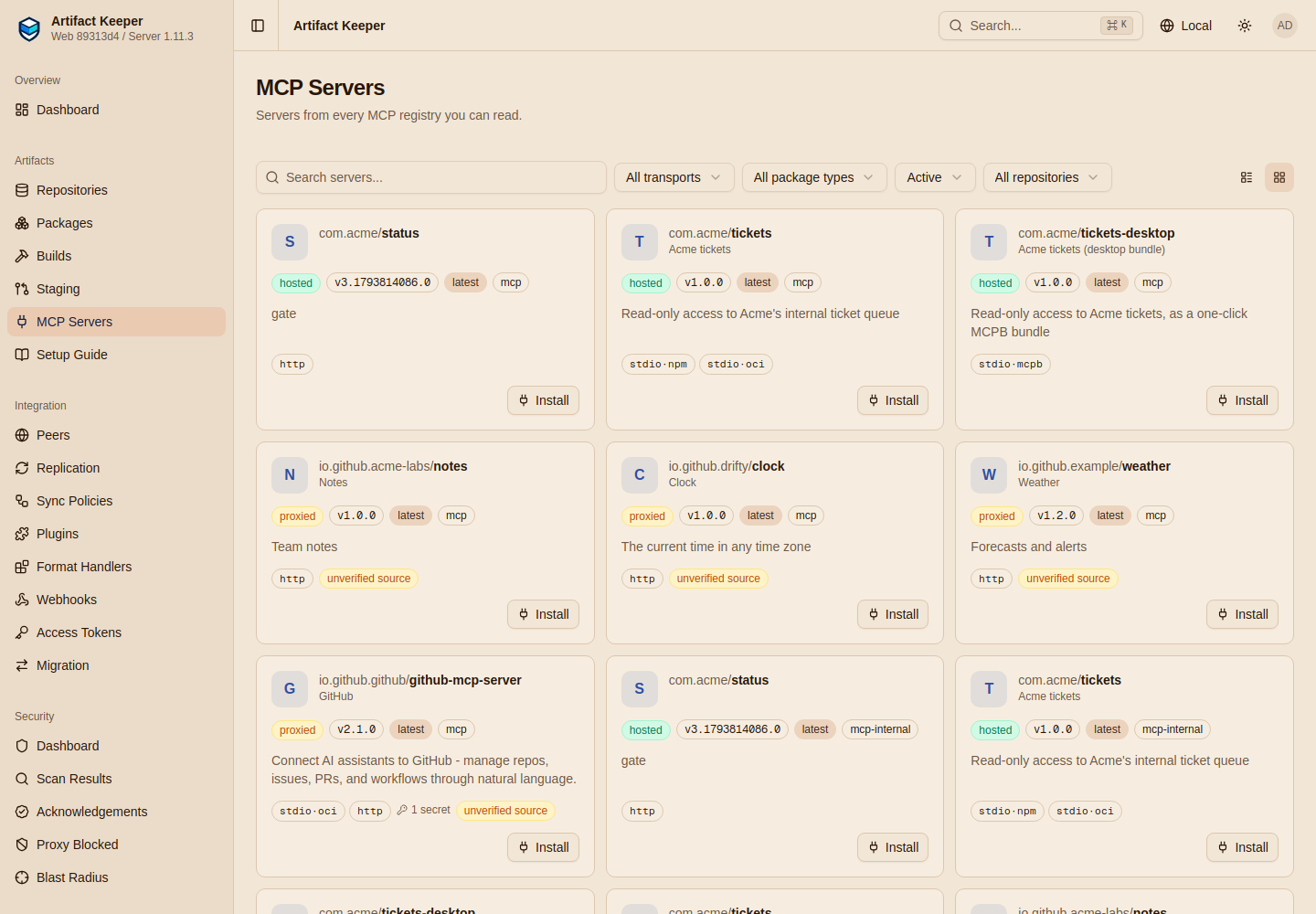
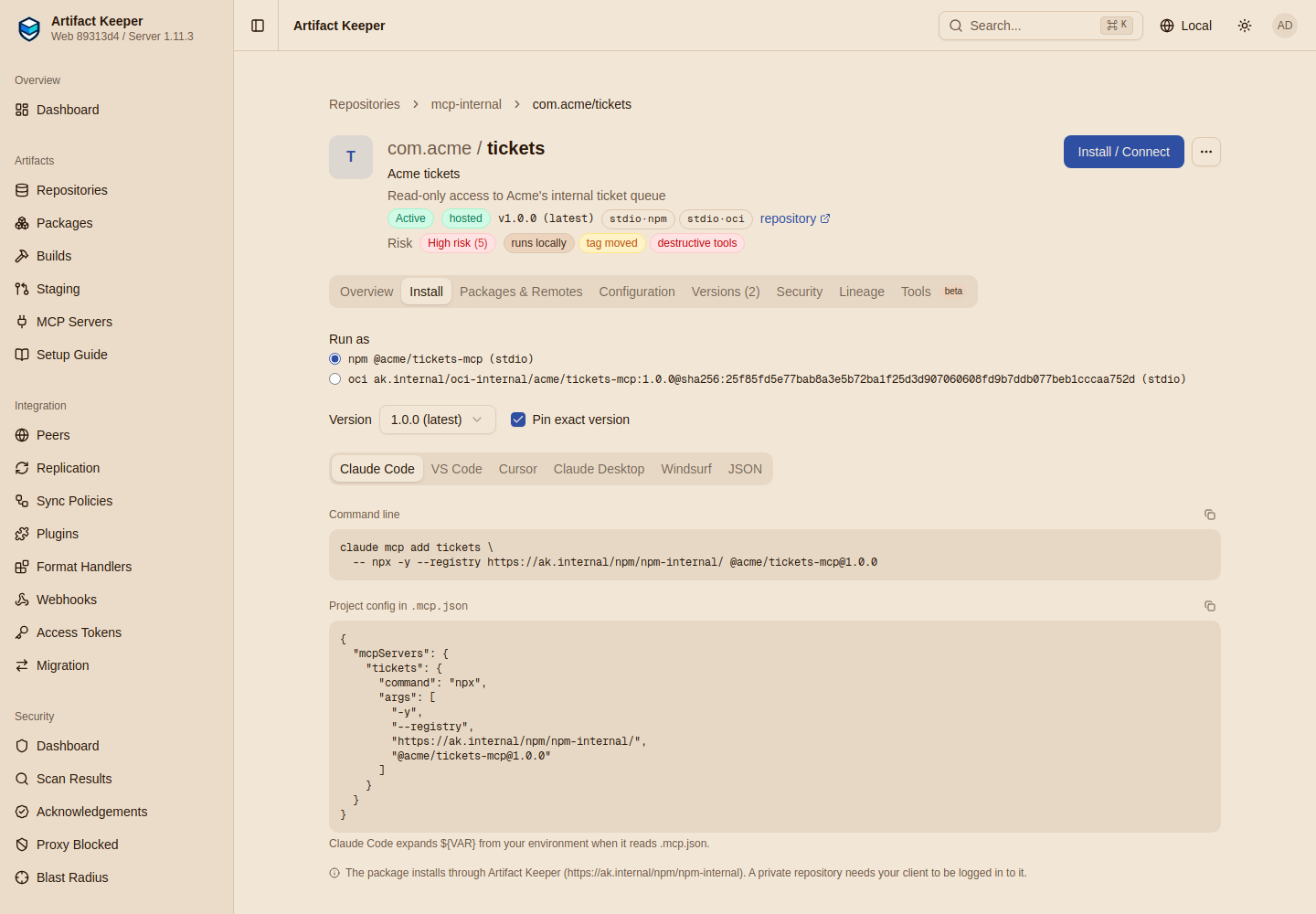
The web UI (artifact-keeper-web#1077) has an MCP Servers gallery and a server page whose Install tab writes the same command for Claude Code, VS Code, Cursor and others: