Step 7: Bundles and capabilities
Preview: needs Artifact Keeper main (coming in 1.12.0)
The mcp repository type is on main and not in a release yet. It is pull request
artifact-keeper#5257
(issue #5253), merged as
4542321b, with the web UI in
artifact-keeper-web#1077
(merged as 896a79db). Both ship in the next release, 1.12.0. The reference run used images
built from the pull request branches (backend c89f9cea, web 89313d4); the branch gained
fixes before it merged, some for the findings here, and the walkthrough has not been rerun
on main. Details may still change before 1.12.0.
Two more things a registry can know about a server: the bundle a desktop client installs with one click, and the tools the server offers.
flows/bundles.sh
runs every call on this page.
Signed MCPB bundles
An MCPB bundle (.mcpb) is a zip with a manifest.json that packages one server, the format
Claude Desktop installs. The mcpb CLI packs and signs one; Artifact Keeper verifies the
signature when the bundle is uploaded. Trust is an operator allowlist of signing certificates,
not a certificate authority: MCP_TRUSTED_BUNDLE_SIGNERS holds their SHA-256 fingerprints.
registry/up.sh generated a lab signer and put its fingerprint there before the backend
started. This step turns the requirement on:
$ PATCH /api/v1/repositories/mcp-internal {"mcp_require_bundle_signature":true}
{"mcp_require_bundle_signature":true}
The mcpb CLI comes from npm through the registry (npx --registry https://ak.internal/npm/npm/
@anthropic-ai/mcpb@2.1.2). It packs
servers/acme-tickets/bundle/manifest.json
and the server into three bundles: unsigned, self-signed with a new certificate, and signed by
the trusted lab signer.
A bundle is uploaded beside a version before the version is published:
-- upload unsigned.mcpb:
HTTP 422
{"detail":"this registry requires signed MCPB bundles (mcpb sign)","error":"mcp_bundle_unsigned",...}
-- upload self-signed.mcpb:
HTTP 422
{"detail":"this registry requires MCPB bundles signed by a trusted signer; this signer's certificate fingerprint is not on the instance's trusted signer list","error":"mcp_bundle_signer_untrusted",...}
-- upload acme-tickets.mcpb (signed by the trusted signer):
HTTP 201
{"file":"acme-tickets.mcpb","fileSha256":"941ed51faf158e08605a503e011435a16ec4846b8941f024c7feae4f12ac2c0b",
 "signature":{"state":"valid","signer":"Acme MCP bundle signing (lab)","fingerprint":"1d7044a9..."},
 "packageEntry":{"fileSha256":"941ed51f...","identifier":"https://ak.internal/mcp/mcp-internal/v0.1/servers/com.acme/tickets-desktop/versions/1.0.0/bundles/acme-tickets.mcpb",
   "registryType":"mcpb","transport":{"type":"stdio"}}}
A bundle changed after signing is refused too (gate G9). The publish of
com.acme/tickets-desktop 1.0.0 uses the packageEntry the upload returned as its
packages[0]. A server with no other package cannot leave packages out and rely on the
registry to add the entry
(lab notes, D2).
Download tickets
The registry is private, but a desktop client handed the document should not need a registry token to fetch the bundle. An exact read by an authenticated caller adds a single-use ticket (valid five minutes) to the bundle URL; a listing does not:
$ GET /mcp/mcp-internal/v0.1/servers/com.acme%2Ftickets-desktop/versions/1.0.0     (developer)
https://ak.internal/mcp/mcp-internal/v0.1/servers/com.acme/tickets-desktop/versions/1.0.0/bundles/acme-tickets.mcpb?ticket=<redacted>
$ GET /mcp/mcp-internal/v0.1/servers?search=desktop
https://ak.internal/mcp/mcp-internal/v0.1/servers/com.acme/tickets-desktop/versions/1.0.0/bundles/acme-tickets.mcpb
-- download with the ticket and no credential:
HTTP/2 200
cache-control: private, no-store
x-checksum-sha256: 941ed51faf158e08605a503e011435a16ec4846b8941f024c7feae4f12ac2c0b
sha256 of the download: 941ed51faf158e08605a503e011435a16ec4846b8941f024c7feae4f12ac2c0b
-- the same ticket again: HTTP 401
A bundle is gated like any package: quarantine it, or hold its version, and the download is
the plain 404.
Capabilities: what tools a server offers
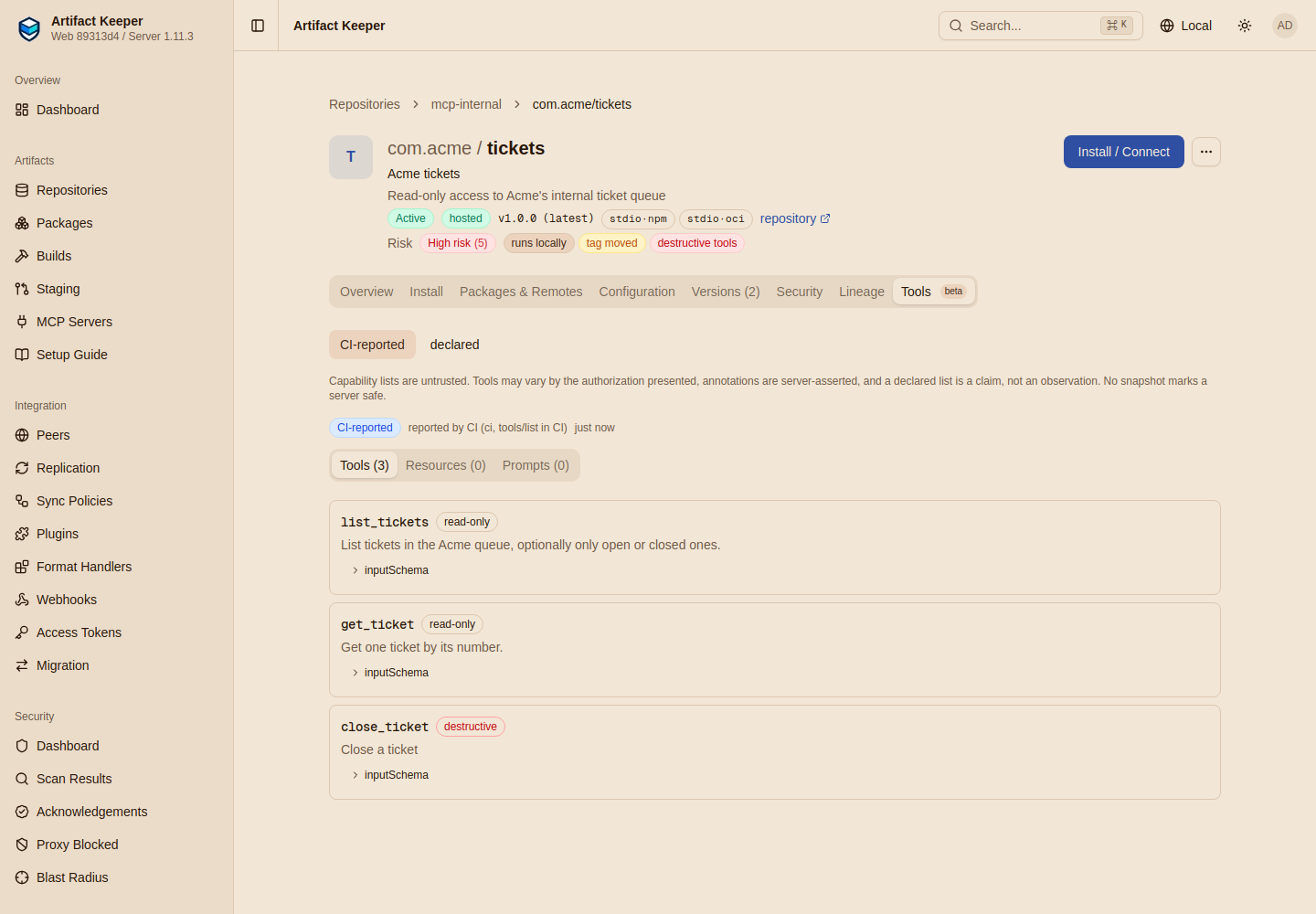
The registry keeps capability snapshots of each version (tools, resources, prompts) with where each list came from. The bundle's manifest declared two tools:
$ GET .../com.acme%2Ftickets-desktop/versions/1.0.0/capabilities
{"current":{"source":"publisher_declared","provenance":"declared in MCPB manifest","tools":["list_tickets","get_ticket"]},
 "notice":"Capability lists are untrusted. Tools may vary by the authorization presented, annotations are server-asserted, and a declared list is a claim, not an observation. No snapshot marks a server safe."}
A pipeline can report what the server actually answered. The script runs tools/list on the
installed com.acme/tickets 1.0.0 with mcp-call and posts it as ci_reported, then posts a
second report with one more tool, close_ticket, marked destructive, as a later build might:
$ POST .../com.acme%2Ftickets/versions/1.0.0/capabilities {"source":"ci_reported","generatedBy":"tools/list in CI","tools":[...]}
{"source":"ci_reported","provenance":"reported by CI (ci, tools/list in CI)","tools":2,"drift":null}
$ POST ... (three tools)
{"source":"ci_reported","tools":3,"drift":{"scanId":"..."}}
$ GET .../capabilities/diff?source=ci_reported
{"summary":"Tools: +1 added (`close_ticket` now destructiveHint: true)","destructiveAdded":["close_ticket"]}
The change is a tool_drift finding (severity medium for a CI report, high for an
observed probe) on the server version's scan results, next to the lint, and a scan policy can
hold on it. The new tool also got a destructive_tool lint warning. The Tools tab shows the
current list with its provenance:
Artifact Keeper can also observe tool lists itself, by probing remote servers and running
stdio packages in a sandbox (the ak-mcp-introspector worker). That needs a gVisor or
microVM runtime and is not part of this walkthrough.