Step 1: Stand up Artifact Keeper
Every later step reads from or writes to one Artifact Keeper instance, so it comes first. By the end of this page you have the registry running, every repository the walkthrough uses, and a first RPM of your own in a hosted repository.
Make target: make registry-up, which runs
registry/up.sh and then
registry/bootstrap.sh.
Start the stack
Artifact Keeper ships a docker-compose.yml that brings up Postgres, OpenSearch, the Rust
backend, the Next.js web UI, and a Caddy front door on port 30080. The proof of concept runs it
with rootless podman, and it serves requests about a minute after it starts. Three settings are
worth knowing about up front, because the rest of the walkthrough depends on them:
- Generate the secrets before the first start.
JWT_SECRETandAK_WEBHOOK_SECRET_KEYneed real values.up.shcreates them withopenssl randand also setsADMIN_PASSWORD, so the instance comes up ready to use with no interactive setup. Nobody should be typing passwords into a console as part of an automated deployment. - Make the edge repositories public. Repositories are private by default, which is the
right default for a registry. Edge nodes need to read anonymously, so every repository in
this walkthrough is created with
is_public: true. - The OCI registry is path-based. Images live at
host:30080/<repo-id>/<image>:<tag>, and the first path segment picks the repository. This is what lets one registry hold separate image repositories, each with its own policy.
When it is up, the web UI is at http://localhost:30080 (user admin, password in
registry/.env).
Create the repositories
Bootstrapping is a handful of POST /api/v1/repositories calls. Remote RPM repositories need
a concrete baseurl (mirrorlists are not supported), and Artifact Keeper generates the
repodata for hosted repositories itself, so there is no createrepo step. One remote RPM
repository and the hosted OCI repository look like this:
curl -X POST http://localhost:30080/api/v1/repositories \
  -H "Authorization: Bearer $TOKEN" -H 'Content-Type: application/json' \
  -d '{"key":"rpm-rocky10-baseos","name":"Rocky Linux 10 BaseOS (proxy)","format":"rpm",
       "repo_type":"remote","is_public":true,
       "upstream_url":"https://dl.rockylinux.org/pub/rocky/10/BaseOS/x86_64/os/"}'

curl -X POST http://localhost:30080/api/v1/repositories \
  -H "Authorization: Bearer $TOKEN" -H 'Content-Type: application/json' \
  -d '{"key":"oci-bootc","name":"bootc images","format":"docker",
       "repo_type":"local","is_public":true}'
Note that OCI repositories use the format name docker, and hosted repositories are
repo_type: local.
bootstrap.sh writes the dnf configuration every image build uses, and nothing else. Here is
the first repository in it:
[rpm-rocky10-baseos]
name=Rocky Linux 10 BaseOS (proxy)
baseurl=http://host.containers.internal:30080/rpm/rpm-rocky10-baseos
enabled=1
gpgcheck=1
repo_gpgcheck=1
gpgkey=file:///etc/pki/rpm-gpg/RPM-GPG-KEY-Rocky-10
metadata_expire=6h
host.containers.internal is how a podman build container reaches the host. Package and
metadata signatures are checked from the start; Step 6 explains where
each signature comes from.
Upload an RPM
Uploading your own RPM is one PUT, and dnf sees it in the generated metadata right away:
$ curl -u "admin:$(cat registry/.ak-token)" -T edge-site-config-1.0-3.el10.noarch.rpm \
    http://localhost:30080/rpm/rpm-edge-site/packages/edge-site-config-1.0-3.el10.noarch.rpm
The password here is the API token from registry/.ak-token, not the admin password.
Step 3 builds this package; make rpm does the upload
for you and checks that the server-generated primary.xml.gz lists it.
The full set
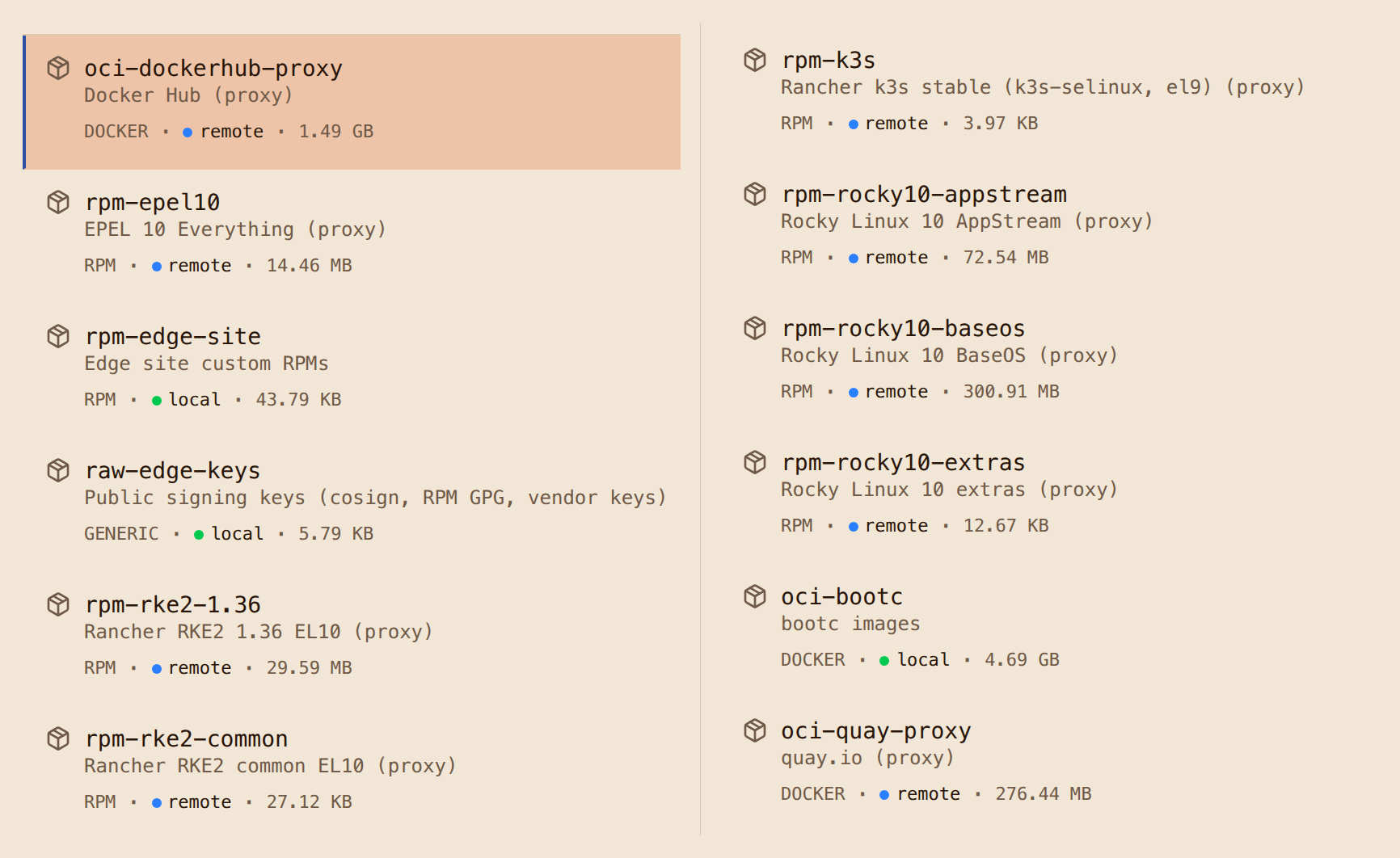
Here is the full set after bootstrapping. All of them are public so that edge nodes do not need credentials to read:
| Repository | Format | Type | Upstream or contents |
|---|---|---|---|
rpm-rocky10-baseos, -appstream, -extras |
RPM | proxy | dl.rockylinux.org, Rocky 10 |
rpm-epel10 |
RPM | proxy | dl.fedoraproject.org, EPEL 10 |
rpm-rke2-common, rpm-rke2-1.36 |
RPM | proxy | rpm.rancher.io, RKE2 EL10 packages |
rpm-k3s |
RPM | proxy | rpm.rancher.io, k3s SELinux policy only; kept for a k3s fallback |
rpm-edge-site |
RPM | hosted | the edge-site-config package |
oci-bootc |
OCI | hosted | base and edge bootc images, and their signatures |
oci-quay-proxy, oci-dockerhub-proxy |
OCI | proxy | quay.io, registry-1.docker.io |
raw-edge-keys |
generic | hosted | public keys (filled in Step 6) |
The whole bootstrap is one shell script, and you can run it as many times as you want: existing repositories and signing settings are detected and left alone. It also creates a scoped API token, so routine pushes and uploads never use the admin password. The API calls and settings this walkthrough uses are collected in the Artifact Keeper notes.
If it fails
podman compose -p artifact-keeper logs backend shows why. A backend that exits right
after starting is the secrets check; see
Troubleshooting.
The script is safe to re-run.