Step 4: Install on bare metal with a kickstart
With the edge image from Step 3 in the registry, this page installs it on a node and checks that everything the node runs came from Artifact Keeper.
Make targets: make vm-install, make vm-boot and make vm-verify. The kickstart
template is deploy/ks.cfg.in, rendered by
deploy/render-ks.sh.
Netboot the stock installer
Deploying a node works the way Enterprise Linux installs have worked for a long time:
network-boot the stock installer and hand it a kickstart. There is no custom ISO, no disk image
to copy around, and no bootc-image-builder. The installer (Anaconda) in Rocky 10.2 knows how
to pull a bootc image and deploy it as the payload.
The harness boots the installer's own vmlinuz and initrd.img from the Rocky 10.2
mirror's images/pxeboot/ directory, and serves the kickstart and a cached copy of the
installer's stage2 over HTTP. In a real rack that is a PXE server and a DHCP option. In the
proof of concept it is a small HTTP server next to the VM.
The kickstart
The kickstart is the interesting part. This is the template rendered with its defaults,
abridged: Step 6 adds the signature policy to %pre, and the
real file has a few more %post lines for it.
text
lang en_US.UTF-8
keyboard us
timezone UTC --utc
network --bootproto=dhcp --device=link --activate --hostname=edge-node-01

zerombr
clearpart --all --initlabel --disklabel=gpt
reqpart --add-boot
part / --grow --fstype=xfs

# The registry is plain HTTP (PoC). Anaconda honors registries.conf.
%pre --erroronfail --log=/tmp/ks-pre.log
mkdir -p /etc/containers/registries.conf.d
cat > /etc/containers/registries.conf.d/50-poc-insecure.conf <<'EOR'
[[registry]]
location = "10.0.2.2:30080"
insecure = true
EOR
# Step 6: fetch the public key and write the signature policy here.
%end

ostreecontainer --url=10.0.2.2:30080/oci-bootc/rocky-edge:10 --transport=registry

rootpw --lock
sshkey --username=root "ssh-ed25519 AAAA..."

%post --log=/root/ks-post.log
# Same drop-in on the installed system, so bootc upgrade can reach the registry.
mkdir -p /etc/containers/registries.conf.d
cat > /etc/containers/registries.conf.d/50-poc-insecure.conf <<'EOR'
[[registry]]
location = "10.0.2.2:30080"
insecure = true
EOR
%end

reboot
Notice there is no %packages section. The image is the package list. The only per-node
inputs are the hostname and the operator's SSH key, and the installer never asks anyone to type
a password. The kickstart flow on the Architecture page
shows every step in order.
Two lessons from this step
Use ostreecontainer, not the newer bootc kickstart command. Both commands validate on
Rocky 10.2, and the bootc command (which runs bootc install to-filesystem under the hood)
is where the installer is headed. When we tried it on Rocky 10.2, the installed system had the
wrong SELinux labels on the root SSH key and on /etc/resolv.conf. sshd could not read the key
and NetworkManager could not write DNS, so the node was unreachable, and a restorecon in
%post did not fix it. The same image installed with ostreecontainer (which runs
ostree container image deploy) came up correctly labeled with SELinux enforcing. We did not
chase the root cause any further. The lesson for a fleet is that you have to test the install
path, not just the image. The symptoms are in
Troubleshooting.
Mark the registry insecure in both places. Anaconda pulls the image inside the installer
environment, so the registries.conf.d drop-in has to exist there (that is the %pre). The
installed system needs the same drop-in for bootc upgrade, so the edge-site-config RPM
bakes it into the image, and the kickstart writes it into the installed /etc as well. In
production you would terminate TLS at Artifact Keeper's Caddy front door and distribute the CA
instead; see Next steps. The mechanics are the same.
Power on
Here is what happens on power-on, with KVM:
| Milestone | Time |
|---|---|
| Installer boots, applies the kickstart, pulls and deploys the image, reboots | 65 s |
| SSH answers on the installed system | 25 s after first boot |
| RKE2 node Ready | 61 s after SSH |
| Demo workload Running | shortly after |
Verify the node
make vm-verify runs a verification script over SSH. This is the output that made the whole
exercise feel worth it:
=== bootc status ===
spec:    image: 10.0.2.2:30080/oci-bootc/rocky-edge:10   transport: registry
booted:  version: 10.2-3   imageDigest: sha256:d4f3ec69bbd3...
=== getenforce ===
Enforcing
=== kubectl get nodes -o wide ===
NAME           STATUS   ROLES                VERSION          OS-IMAGE                        KERNEL-VERSION
edge-node-01   Ready    control-plane,etcd   v1.36.5+rke2r1   Rocky Linux 10.2 (Red Quartz)   6.12.0-211.61.1.el10_2.x86_64
=== workload image / imageID ===
default/nginx-demo-...  docker.io/library/nginx:alpine  docker.io/library/nginx@sha256:df221db8...
=== Artifact Keeper: oci-dockerhub-proxy ===
98 cached objects; images: library/nginx, rancher/hardened-calico, rancher/hardened-coredns,
  rancher/hardened-etcd, rancher/hardened-kubernetes, rancher/klipper-helm, rancher/rke2-runtime, ...
OK: nginx-demo runs nginx:alpine @ sha256:df221db8..., and that manifest is cached in oci-dockerhub-proxy
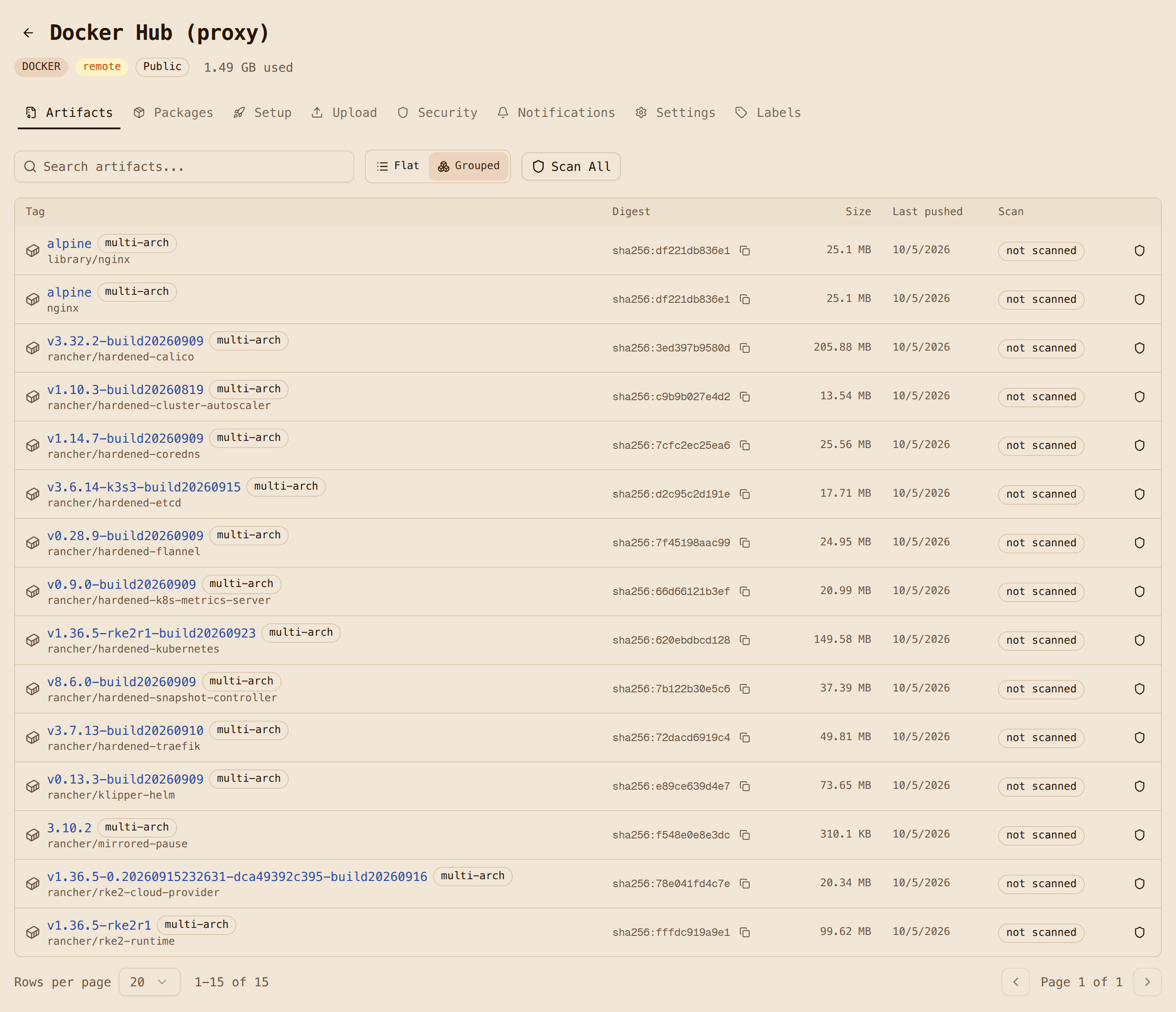
Every image the cluster pulled, from rancher/hardened-calico to the demo's nginx:alpine,
is now cached in oci-dockerhub-proxy. You can see it in the Artifact Keeper UI right next to
the RPMs and the operating system image that produced the node.
If it fails
vm-install refuses to start while a VM is running; make vm-clean vm-all starts from a
fresh disk. A timeout is covered in
Troubleshooting, and the full install log
is in the deploy notes.